
WiFi Cameras for Home Security in Pakistan: What to Look For
What these cameras are for, and what they are not What these cameras are for, and what they are not Before you spend money on a WiFi camera, it helps to be clear about what it can actually do. A WiFi camera is a small, affordable way to keep an eye on your home when you are not there. It is not a
Is guide me se products
Nyvoxa ke actual products — COD, 7-day return aur warranty ke sath.
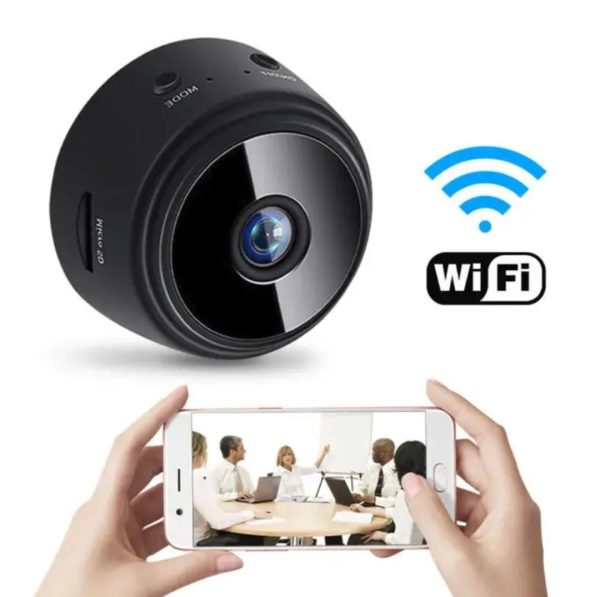
A9 WiFi Mini Camera 1080P HD | Magnetic Wireless Security Camera | Night Vision | HDSF App Remote View | Motion Detection
What these cameras are for, and what they are not
What these cameras are for, and what they are not
Before you spend money on a WiFi camera, it helps to be clear about what it can actually do. A WiFi camera is a small, affordable way to keep an eye on your home when you are not there. It is not a full security system, and no honest seller should tell you otherwise.
What it does well: it deters casual intruders who see a camera and decide the next house is easier. It lets you check on a delivery rider at the gate, see whether the maid came on time, watch a pet, or look in on an elderly parent. It gives you a recording if something does happen. That is real value for a few thousand rupees.
What it does not do: it does not stop someone who is determined. It does not replace a good lock, a lit entrance, or a neighbour who knows your routine. A camera records a problem; it rarely prevents one on its own. Treat it as one layer, not the whole wall.
Resolution: what 1080P actually means
Both cameras here are 1080P, which is the sensible minimum today. In practice, 1080P gives you a clear enough picture to recognise a face at close range and read a number plate if the car is near and still. At 20 feet in poor light, you will see a person, but not always identify them. Anyone promising more from a budget camera is overselling.
Night vision: read the fine print
Night vision on these cameras is infrared, which means black-and-white footage in the dark. It works well in a small room or a covered entrance. It struggles through a window at night, because the infrared reflects off the glass. If you plan to point it outside, mount it under a shade or near a light source.
A9 WiFi Mini Camera 1080P HD | Magnetic Wireless Security Camera | Night Vision | HDSF App Remote View | Motion Detection" loading="lazy" decoding="async">Speed-X Bulb Camera 1080P WiFi 360°" loading="lazy" decoding="async">Which one suits you
The A9 WiFi Mini Camera 1080P HD is the small, flexible option. It is magnetic, wireless, and runs on its own battery, so you can place it almost anywhere for a few days at a time. At Rs 1,299, reduced from Rs 2,500, it is the cheapest way to try home monitoring. Best for a room, a shop counter, or a temporary setup. The trade-off is battery life and a narrower view.
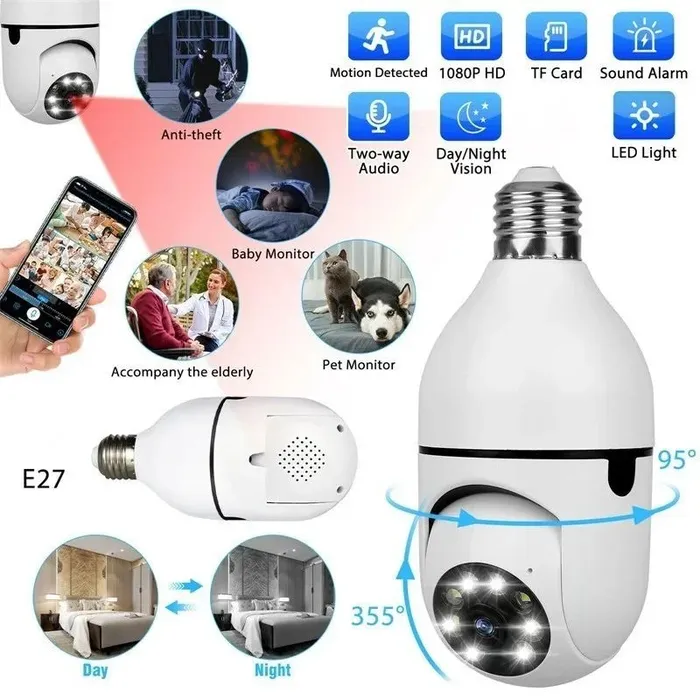
The Speed-X Bulb Camera 1080P WiFi 360° at Rs 3,499 screws into a normal light socket, so there is no wiring and no charging. The 360° view covers a full room or a driveway from one point. It is the better pick for an entrance or a front gate where you want constant coverage. The trade-off is that it needs a socket in the right place.
If you only want to check on a pet or a delivery, the A9 at Rs 1,299 is enough. If you want to watch an entrance every night, spend the extra on the Speed-X. Neither is worth buying if you have not fixed your door lock first.
Cash on Delivery is available nationwide. Delivery is 2-4 working days in Karachi, Lahore, Islamabad, Faisalabad and Multan, and 3-5 working days elsewhere.
The two cameras compared
The two cameras compared
Most people shopping for a WiFi camera in Pakistan end up looking at two shapes: the small magnetic camera that sits almost anywhere, and the bulb camera that screws into a light socket. Both record in 1080P, both work over WiFi, and both are controlled from your phone. The differences matter more than the price gap suggests, so let us go through them one by one.
Resolution
Both are 1080P HD. In daylight, you will get a clear picture from either one. There is no real winner here, so do not let anyone tell you one is sharper than the other. What changes the picture quality is placement and lighting, not the spec sheet.
Night vision
Both have night vision, and both switch to black and white in low light. This is normal for cameras at this price. If your street has a porch light on through the night, both will perform better. If you are covering a completely dark corridor, expect usable footage but not fine detail like a face at ten feet.
Viewing angle
This is where the two separate. The A9 WiFi Mini Camera 1080P HD has a fixed lens, so you point it at one spot and it watches that spot. The Speed-X Bulb Camera 1080P WiFi 360° pans around, so one unit can cover a room, a shop counter, or a driveway. If you want to cover a wide area with a single camera, the bulb camera is the practical choice.
Storage
Both support a microSD card for local recording, and both let you view live from the HDSF App on your phone. Neither comes with a subscription requirement, which is a plus. Buy a memory card of a reasonable size and set it to record on motion only, otherwise the card fills up in a few days.
Power and what happens in a load shedding
This is the part most buyers overlook.
The A9 mini camera runs on a built-in battery. That means during a power cut it keeps working, and you can also move it from room to room without unplugging anything. It is magnetic, so it sticks to a fridge, a metal door frame, or the bracket in the box. For a flat in Karachi or a house in Multan where load shedding is a daily routine, this is a genuine advantage.
The bulb camera needs mains power. It screws into a normal bulb holder and only works while that socket has electricity. During a power cut, it goes off. If you want it to survive load shedding, you need to run it through an inverter or UPS, and that adds cost. Be honest with yourself about this before you buy.
Which one should you buy
Buy the A9 WiFi Mini Camera 1080P HD at Rs 1,299 if you want something small, battery powered, and easy to move around. It suits a single door, a room, or a shop counter where you mainly want to check in from your phone. At that price, reduced from Rs 2,500, it is fair value for what it does.
Buy the Speed-X Bulb Camera 1080P WiFi 360° at Rs 3,499 if you need to cover more ground and you have a powered socket where you want it. It gives you a wider view and panning, but you are paying more and you lose coverage during a power cut unless you have backup power.
Both are in stock and both are available with Cash on Delivery across Pakistan. Delivery is 2 to 4 working days in Karachi, Lahore, Islamabad, Faisalabad and Multan, and 3 to 5 working days elsewhere.
Installing it without giving yourself away
Installing it without giving yourself away
You have bought the camera. Now the important part: where you put it, and how you set it up. A camera in the wrong spot is either useless or easily defeated. A camera on a careless network is a window into your home for someone sitting far away. This section covers both.
Height and angle matter more than megapixels
Mount the camera at around 2.4 to 2.7 metres, roughly 8 to 9 feet. That is high enough that a person cannot simply reach up and pull it down, but low enough that you still get a face rather than the top of a cap. If you go too high, you get a lovely view of everyone's hair and nothing else.
Angle it slightly downward, not straight across the room. A gentle tilt gives you the doorway and the floor in front of it, which is what actually matters. Test it live on your phone before you drill anything. Walk to the gate, walk to the door, and check what the camera sees. Adjust, then fix it permanently.
Do not point it through a window facing the street
This is the most common mistake. Glass reflects. At night, your indoor lights bounce back off the window and the camera sees nothing but a bright blur. During the day, glare washes out half the frame. You also end up filming the street, which brings us to the next point.
If you want to watch your gate or driveway, mount the camera outside under a shade or inside a covered porch, not behind glass. For indoor use, keep it facing the room, not the window.
Keep it on its own network
Most WiFi cameras are cheap devices with basic security. Do not put them on the same WiFi as your laptop, your phone, and your banking apps. If your router supports a guest network, put the camera there. It still gets internet, you still get remote viewing, but it cannot see your other devices.
If your router does not support a guest network, at minimum give the camera a strong, unique WiFi password and keep the router firmware updated.
Change the default password. Today.
Default passwords on budget cameras are published online. Anyone scanning for exposed cameras can find yours and log in. When you set up the app, change the camera's password to something long and unique. Do not reuse your email password. Do not use your birth year.
Also turn on two-factor authentication in the app if it is offered. It takes two minutes and closes the easiest door.
A quick word on legality
You can film your own home and your own entrance. You should not point a camera into a neighbour's window, a shared courtyard, or anyone else's private space. In Pakistan, recording someone without consent in a place where they expect privacy can land you in trouble. Keep it aimed at your own property and you are fine.
Which camera for which job
For a small indoor spot, a doorway, a room, or a shop counter, the A9 WiFi Mini Camera 1080P HD at Rs 1,299 is a sensible starting point. It is magnetic, so you can stick it to a metal surface or use the included mount, and it runs through the HDSF app with night vision and motion detection. At this price, do not expect premium build quality, but for basic indoor monitoring it does the job.
If you need to cover a wider area, a room, a driveway, or a shop floor, the Speed-X Bulb Camera 1080P WiFi 360° at Rs 3,499 is the better choice. It screws into a standard bulb socket, which means no drilling and no separate power cable. The 360° coverage means one camera can replace two fixed ones.
Both are available with Cash on Delivery across Pakistan. Delivery is 2 to 4 working days in Karachi, Lahore, Islamabad, Faisalabad, and Multan, and 3 to 5 working days elsewhere. You pay when it arrives, so you can check the box before handing over the money.
Worth comparing too: Tactical LED Flashlight with Power Bank & Safety Hammer
Worth comparing too: LX-007 Automatic Charging Disconnector
Aksar poochay jane wale sawalaat
Do WiFi cameras work if the internet goes off?
Recording to an SD card keeps working, but live viewing on your phone does not. Anything that alerts you to movement needs the internet, so buy one with a memory card slot as well as app access.
Is it legal to install a camera in Pakistan?
Yes, for securing your own home or workplace. Do not point a camera into a neighbour’s property or a public road. Recording people without consent can be an offence.
How many megapixels do I need?
For a room or a main door, 2 megapixels with night vision is enough to identify a face. Higher numbers help for a large compound or a gate, where detail at distance matters.